Showing posts with label Mac. Show all posts

17 February 2008

"Cute" + Technology = Drool

Once upon a time, in the mid-1990s, I was a "road warrior" with platinum frequent flyer miles, suffering from that shoulder ache you get from lugging too much junk in your carry-on bag. The biggest piece of junk, of course, was the laptop computer. 

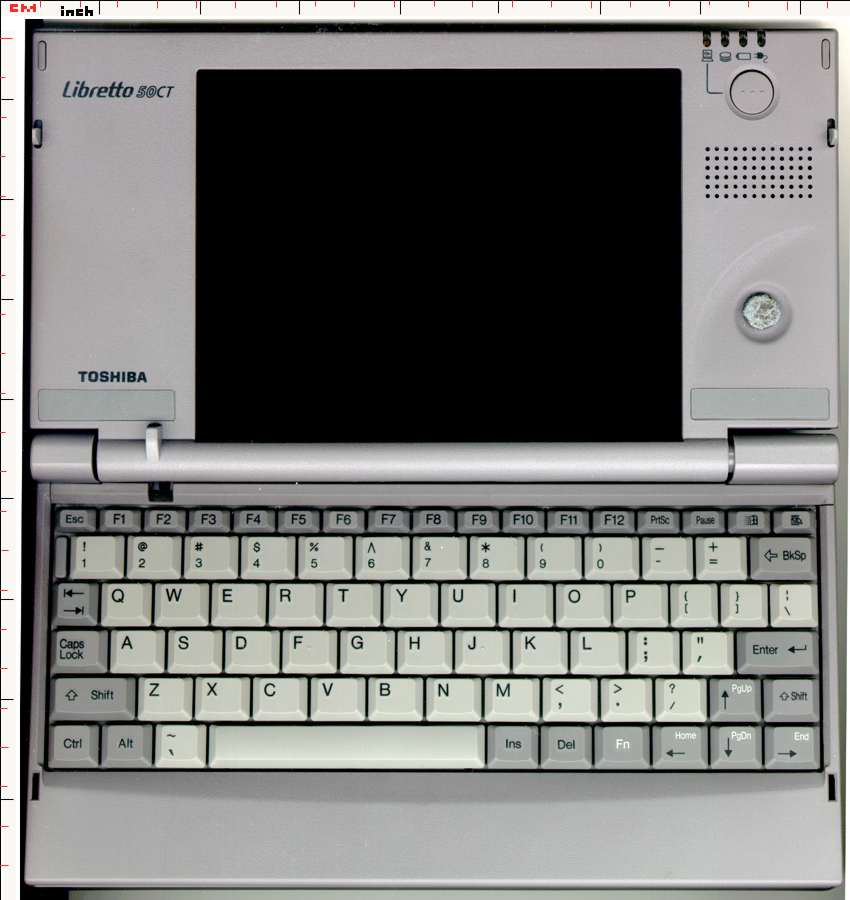
To ease my shoulder, I bought a Toshiba Libretto, one of the first micro-notebook computers. Unlike the PDAs that were all the rage at the time, the Libretto runs *real* Windows software (Win 95 I think?) and has a real keyboard, although I am pretty sure most people could not type on the thing because the keys are so tiny. Importantly, it weighs in at just 2 lbs with the standard battery. It has a modem (remember those?) and an external floppy drive, although I can't remember whether I had to buy that separately or it came with the thing. (At the time of purchase -- 1996ish -- a floppy was all you needed!) It has a 75 MHz Pentium processor, so it was pretty much standard/high performance 10 years ago. In the photo above, you see the Libretto (left) with my Mac Mini and a CD, for size comparison. You can imagine how big the screen and keyboard are. Or click here.  

In addition to being practical, the thing was a very cute conversation piece. Even in Japan, where I traveled a lot, most people had never seen one "in the flesh." So OK, it's not "elegant," but it's functional, compact, and it cost me about $1400. I can't remember whether that included the spare oversize battery &/or any other gizmos I may have bought at the time. 

These days, I am no road warrior. I have not booted the Libretto in years. When I need a notebook at home, I have a 7-year-old Dell. Most often, I sit at the computer desk and use my sweet iMac (pat pat). If I need Windows, I also have a desktop Dell that is faster & more powerful than the laptop (but I have not booted the thing in months). For work, they gave me an IBM laptop that I occasionally carry to meetings or classes, but mostly it sits in its docking station.

So I don't *need* a MacBook Air, but dang if I don't want one. 

As the Houston Chronicle's Dwight SIlverman points out, the Air has the same sex appeal as an iPhone. I should note that I took the photo above with my iPhone. I like sex appeal. In fact, John Gruber at Daring Fireball suggests that the MacBook Air is made for me. It is, he says, the computing analogue to a sporty convertible coupe. Lest anyone forget, I drive a yellow Mini Cooper convertible.

The nay-sayers point out the Air's lack of "necessary" features: just one USB port oh n0z! no Ethernet port, oh n0z! no optical drive, oh n0z! The list goes on. These factors do not concern me. I do worry about battery life; when I bought the Libretto I did get a spare battery, which I occasionally needed. I also hate it that the built-in mouse has only one button. Sorry, Mac purists: I am a right-clicker.

But hey, let's put this in a different perspective for this non-power-user: When I bought my Mini Cooper, I had a choice between the base Cooper and the Cooper S that has the awesome supercharger and some other sweet performance features. I had the $. I could have bought the S, and, in fact, I drooled over it for a long time. In the end, however, the "S" did not come in yellow, and yellow was more important than zoom. (I do not regret the decision, except very occasionally when a little more straight-line acceleration would enable a pass that would relieve some drive-time stress.)

I'm going to go back to The Woodlands Mall today to drool on the Air again. It's sunny, so I might even drive with the top down & iPod blaring through the Mini's speakers, just to get into the right mood. 

10 December 2006

Playing with the Mac :)

Macs are fun :) See Plasq for more information about the ComicLife software I used to make this little window into my day. I can't seem to convince Blogger to publish it big enough to read it on my screen, but if you click on the image, it will open as a larger (i.e., readable) image.

Dog n Squirrel

(Yes, there's a fire in the fireplace. It's freakin' cold here. The Martian -- who is due here on Friday -- reports that it's colder in Houston than in Denmark. That just ain't right.)

I'm still playing with the 30 days of free trial on the Comic Life, but it is fun so far:

20 December 2005

Mac in Denmark

Denmark snows
Here's the view yesterday from the back windows of The Martian's farmhouse in northern Århus, Denmark. It was snowing when I shot this, though I don't think you can see it in the picture. This morning, the snow is mostly melted, and the sky is blue with some puffy clouds.

I've set up MiniMe (my Mac Mini), and it seems happy enough, although it has some interesting "quirks."

First, though, it did have two Small Adventures of its own as it traveled from Houston to Århus. It being a computer worth more than your average clothing item, I lugged it in my carry-on bag rather than stuffing it into checked luggage. I had some doubts about this, as in trips to Europe many years ago, they actually made you turn on your computers to prove that they were not bombs. Since MiniMe is not a laptop (think of it as your whole clunky PC squished into an attractive little MacPackage), there's really no way to prove it's a computer short of hooking it up to an external monitor.

Anyway, Googling on Mac Mini airport found a lot of at least anecdotal evidence that nobody makes you turn on a computer anymore. You stimply carry your cute little Mini & pretend it's a laptop -- put it on the x-ray machine belt separately from your other stuff. So MiniMe came on the trip.

Her first adventure was in Houston when I put her in laptop tray:

"Uh, what is that?" asked the non-Mac-literate TSA employee.

"It's a Mac Mini," said the newly Mac-literate traveler.

"It's cute!" the TSA employee said, with a look that indicated she didn't quite believe it was a computer. But it went through the machine ok, and all was well.

Cut to adventure #2, in Amsterdam. Same deal: Mac in laptop tray.

Dutch airport screener (looking puzzled): "What is this?"

"It's a Mac." (blank stare/frown from screener) "An Apple." (still blank stare) "A small computer." (lightbulb goes on)

"It's small! Is it something new?"

"Sure, new. It's a Mac Mini." (Ignore the fact that in Mac-o-phile world, it's 'old tech.')

As with Houston, it went through the x-ray machine without incident. The same cannot be said for two crafting hole punches, which I brought because I have not quite finished all my handmade Christmas gifts, eek!

Apparently in the Netherlands, hole punches are dangerous. I had to show them that one makes tiny holes and the other makes tiny hearts, to convince them that they were not weapons of mass destruction.

Yesterday was shopping day, which meant trudging around Århus with The Martian and a whole lot of other Danes who took a day off to get their shopping done. Today, The Martian had to work, and so I unhooked the keyboard, mouse and monitor from his boring old PC and hooked up the Mac.

Being a Dane, he has a Danish keyboard with extra keys for the extra Danish vowels I can't pronounce. Squeezing those vowels onto the keyboard meant that they also have moved some other standard typewriter keys, like quotes, question marks, dashes, etc. When I type on his PC, I make words that look like: Iøm (I'm). The Mac, however, ignores the extra keys and just makes them output what IT wants. As long as I don't look at the keyboard, I can type a question mark ? or a quote ' " or a () as usual.

I can't decide whether this makes the Mac smarter or dumber than a PC. It certainly makes me type without looking at the keys, as most non-English-letter keys make something other than what the key shows. For example, the key that says "Ø" actually produces quotes, just like the key in that location at my house does. The key that says "Æ" makes a semicolon, as my fingers expect. This means, of course, that the keys that say they make quotes and semicolons really make something else.

Call it, then, Adventures in Typing. I could actually become a touch-typist by the end of this trip...

Tonight we will have dinner with some friends, including two or three that were among the Danish horde that invaded my home space over the summer. Until then, I should be working on those crafting projects instead of messing with the Mac!

03 December 2005

One big geek

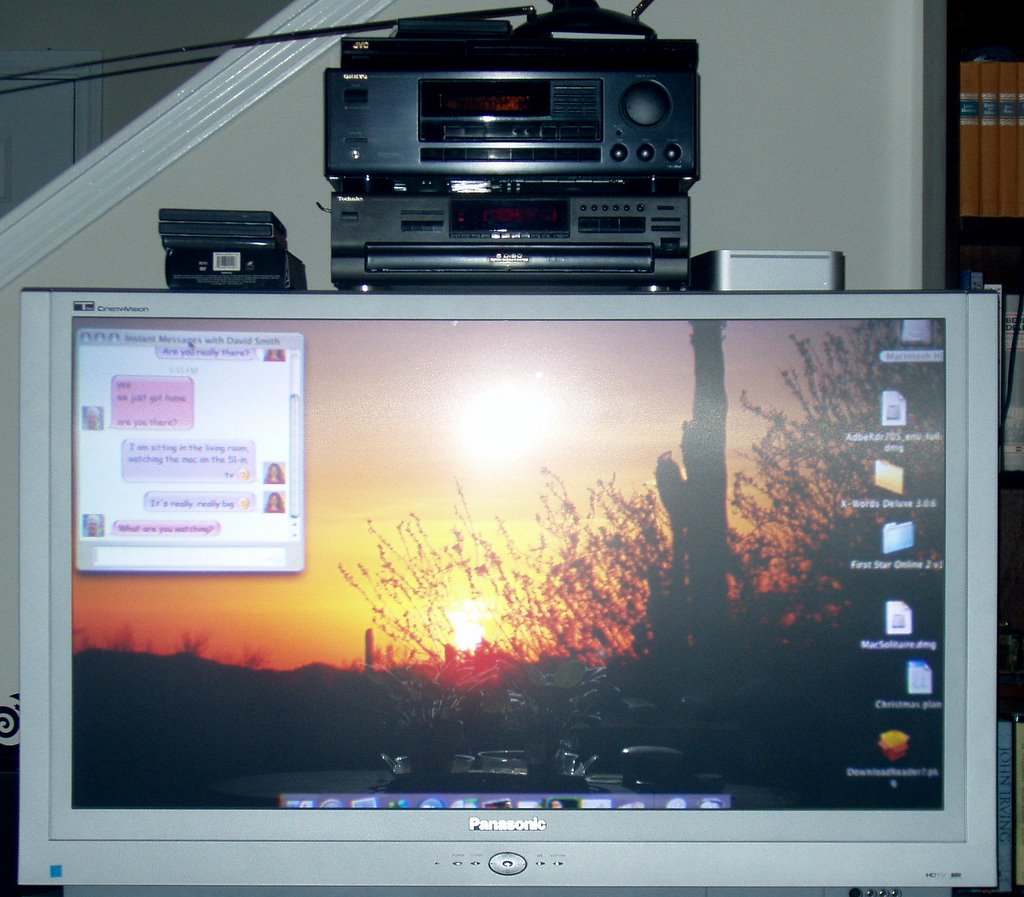
BIG geekWhat you see here is a Mac Mini, the same one I showed you a couple of days ago, but hooked up to a 'slightly larger' monitor. [Mini-Me is there, really. Just to the right of the stereo. Try squinting. And if you squint hard enough at the text on the screen, you can read my iChat with my dad.)

Slightly larger, indeed. The old Dell monitor was a 17-incher. This baby is a 47-in. HDTV screen on which pictures and video look awesome and text becomes a fuzzy blur of unreadable typos. But dang if I can't sit on the couch, here, with my feet up and my wireless keyboard in my lap, mouse handy on the plush armrest, a glass of wine on the end table and the dog gnawing on a rawhide bone next to me. (That would be the dog who is usually not allowed to chew on yucky things on mom's couch, but mom is in Geek Heaven so it's all ok tonight.)

I've been through this 'ok, the pictures look great but I can't read anything' situation before, when I got the 20-in. flat screen for my big Dell a few years ago. OK, it has awesome resolution, but I had to increase the size of the desktop fonts and start reading Word Documents at 135%. (And not just because I'm over 40!) Resolution would be better if we could teach computers to discern between text thingies and non-text thingies to 're-resolve' at the new resolution.

Meanwhile, I have to step back a few hours to tell you the story of the cable. It's a fairly non-specialized thing, a DVI-to-HDMI cable. DVI is what's on the Mac; HDMI is what's on the TV. Many DVD recorders, cable boxes and other fancy techie things use those types of connections.

A jaunt over to Amazon.com was in order. There I found a plethora of such cables ranging from $15 to way more than anybody in their right mind would spend on a cable. (I mean, it's wire with some thingies on the ends, right?) Of course the problem for a true geek is that Amazon.com ships stuff. So you have to wait. Whine!

Thus the Camaro took me on a little trip to the local Technoglomerates, which I'll call Circuits R Us and Best Boys. I have to give them credit for at least having salespeople with a clue. When I said, "I need a DVI-to-HDMI cable" they knew what it was & where it could be found. They also only stock only the most expensive gold-plated cable brand in the universe. A mid-grade 6-foot cable on Amazon cost $35. These were over $100. For that, I could get two of them and overnight shipping at Amazon!

I had to stop for dog food at PetSmart among my shoping errands, and since Wal*Mart was on the way home, I thought I'd see whether they had anything. Say what you will about Wal*Mart. If you don't need the dang gold-plated wires, Wal*Mart has some that will work just fine & beat Amazon on even three-day shipping.

So I ran home with the cable, hooked it up & voila. A computer screen I can't read from the couch. But how cool is a slideshow of your vacation pix on an HDTV monitor? Sure, I could burn them onto a DVD but how lame & old-school is that?

Geekette & muttThe problem is (and oh yes, there's a problem), computers don't like televisions. They like 'monitors.' If you are a Mac person, you will notice right away on the above picture that some things are missing. Key things. The entire top bar is gone, and the bottom 'dock' is half gone. This is a very common issue when connecting any computer (Mac or otherwise) to a television. It's called "overscan." Apparently TV typically sends a lot of nonsense along with the picture, and the television set is prepared to ignore that & show you only the actual picture in the middle of the nonsense. Computers don't bother with nonsense... which means the TV cuts off useful things -- in this case, all my Mac menus.

There are fixes for this. Two pieces of software purport to let you lie to the television so it thinks the usual nonsense is there. Unfortunately, even though they purport to include clear instructions about how to make it work, I am too dumb. Then again, it's shareware and I haven't registered it yet. I don't mind registering & paying for good shareware. I do it often, in fact. But (duh) I like to see that it actually does something before I shell out $. And I can't seem to make these programs do anything for me at all, except take up space on the hard drive.

Anyway, I know it will work out, and soon I'll be crowing about how lucky I am to be typing on a 1920 x 1080 HDTV monitor on which I can't read beans, but wow the pictures are really pretty.

By the way, the dog DOES notice Purp's barks over the stereo speakers. iTunes sounds a lot better, too!

30 November 2005

The War for your Computing Soul

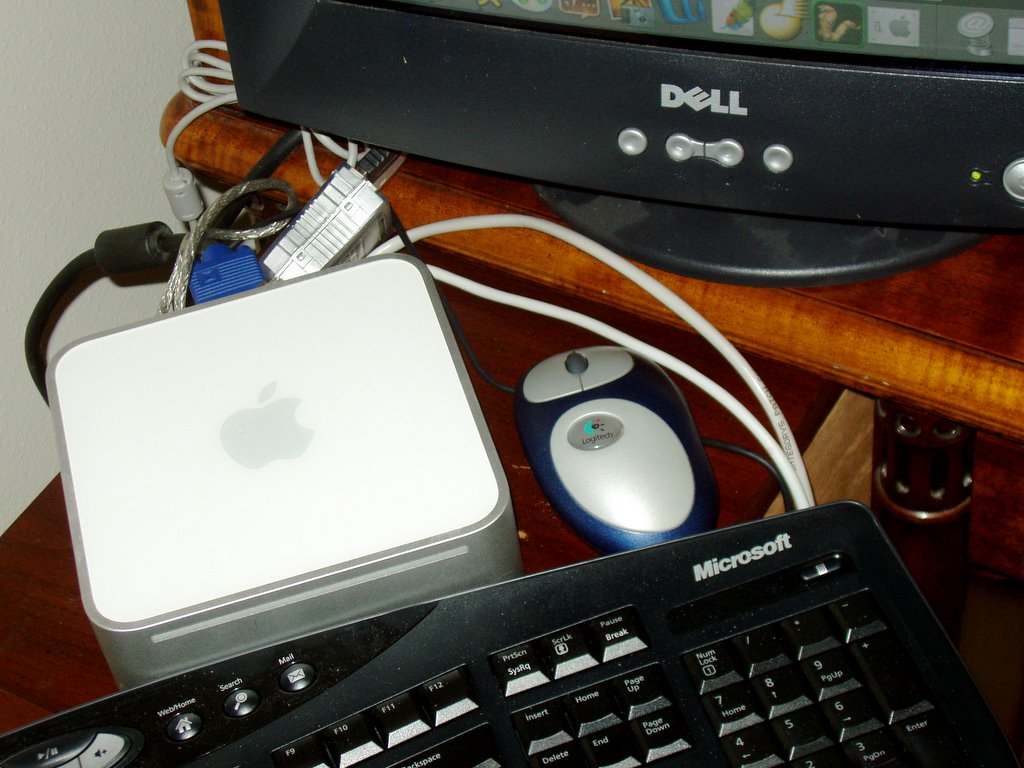
Mini-Me with non-Apple stuff
If you are an iGeek, you won't like what I say here. If you are a PC snob, you won't care. And that just about sums up the whole war of PC vs. Mac.

Mac is the downtrodden, the Avis of the personal computing world, the second child. No matter how good it is, it is not No 1, and this drives its fans nuts. They are underappreciated and misunderstood, and if only the world would listen to them, they are sure that everyone would join them. Sound like a weird new religion? Call it the Cult of i, or iCult for short.

The most rabid of the iCult factions is the FUndamentalist Mac usERs. FUMERs worship Apple, but they realize that Apple is an imperfect diety, especially since the company began "catering to Switchers." Switchers are, of course, Windows users who have Seen The Apple. FUMERs still use 1980s-era Apple technology (e.g., a one-button mouse) "because the old ways are best and no self-respecting real Mac user would have that newfangled crap near their computer."

In many Christian religions, being 'born again in Christ' means relinquishing your past life of sin. You are generally allowed to retain the unsullied parts of your Self. In the iCult, being 'born again in the Apple' means not only relinquishing the bad parts of your past Windows life but also the good, useful parts. Because under iCult teachings, nothing good ever came from Microsoft (e.g., Satan).

The non-Apple PC world is more like one of those new non-religions where you can wear jeans to church and hear uplifting sermons with lots of bullet points saying that it's ok to be rich and skinny and even covet the preacher's beautiful wife, as long as the church gets its cut. On the Windows version, they basically say "We don't care whose computer you use, or what other stuff you plug into it, even Apple stuff if you want, as long as we get our cut." It's sort of an uber-tolerant way of accepting individual needs/wants. Not much religion, but whatever works.

The Cult of i, on the other hand, is intolerant. They pretend to be tolerant, offering Microsoft Office for Mac, but Mini-Me whimpered when we installed it. "Are you sure you want to put that ...that... serpent on this pretty, unsullied machine? [pout] You didn't even try the nice AppleWorks suite that we installed for you!" And don't even ask about plugging in my multi-button, scroll-wheel mouse or my Microsoft keyboard: Oh, the wailing!

I am happy with the Mac, really. I had one 20-ish years ago, and I liked it then, too. But in the end of the day, it's just another tool. Not much different from my Dells, really. And although I have chosen to use the Mac tool over the Dell tools for the bulk of my computing activities, I don't consider it vastly superior. And that's why most switchers will always stand on the outside edge of the iCult, looking in.

26 November 2005

Mac Attack!

I am officially a Mac user again!! Who knew a computer could be so fun & so cute?

The unnamed male relative is in town for Thanksgiving to dump some of his 'old' Apple hardware on me & the parents. Mom & Dad got a very attractive iMac to replace their early Triassic (and semi-functional) Gateway beast; I got a cuddly cute Mac mini (since I had an extra monitor & mouse in the closet).

The conversion of Windows-heads to Mac-brains has been slightly stressful, as the UMR has been working hard to convince us to go cold turkey on habits that we have picked up over some 20 years of PC use. I have only once had to remind him who was the first person in the family to own a Mac (me).

That was back in the mid-'80s, back when a Mac was a sort of bulky extra-large Kleenex box with a floppy slot on the front. Back then, PC meant DOS -- EEK. I was upgrading from an Apple II+, so the Mac seemed a logical step.

I don't remember how/why I ended up with PCs, but I donated the Mac many years ago to the UMR for his 'museum.'

Anyway, the re-education of Windows users has been a learning experience for the UMR, who is a trainer at the Unnamed Manufacturer of Cute Computers. It's a holiday weekend, so I will not type that my dad is a troglodyte, but if I did, it would not be too far off the truth. "I want it to work just like (name of Windows application)," he keeps saying, and to give the UMR credit, he is trying to make it so -- through gritted teeth.

Mom is more relaxed about it, open to learning a new way to read her mail, edit her pictures and generally work with a computer.

I'm a little of both. I don't take well to instruction; I like to fiddle with things & see how they work, then bend them to my will ;) For example, the UMR suggested that "Real Mac Users" don't need no stinkin' scroll thingie or multiple buttons on their mouses, but (whew) my three-button/scroll wheel mousie does retain its functionality on the Mac. I remember when I first got the scroll wheel, thinking, "Who needs this nonsense?" but now I can't imagine computing without it. Interestingly, the 'End' key on the keyboard does not function as expected, so I'll have to learn a workaround for that habit as well. There are also some issues with the way that I want to use iPhoto; he grits his teeth & says, "Well, you CAN do that but..." so I will try to be open-minded about different ways to organize my 'stuff.'

Some of my mission-critical software only runs in Windows, but my ancient printers may create the ultimate block to being able to go totally Windows-free. Two of the three are from an ancient culture that used parallel ports for printing; the third also pre-dates OS X and does not wish to work across a network with a Mac. I believe direct connection to the Mac could make it work, but I worry, then, that the Mac may not want to share that resource ;)

Time will tell. For now, it's just fun to fiddle with stuff. And the mini is cute as a button. I just want to cuddle it. I'd show a picture but I haven't had time to get my camera to talk to the Mac yet ;)